 Alltabs
For Chrome on desktop
Your other tabs,
within reach.
That page you left on your laptop? Find it here. Browse tabs from your other Chrome devices in one persistent side panel.
Available now on the Chrome Web Store.
Free & open source · Local processing
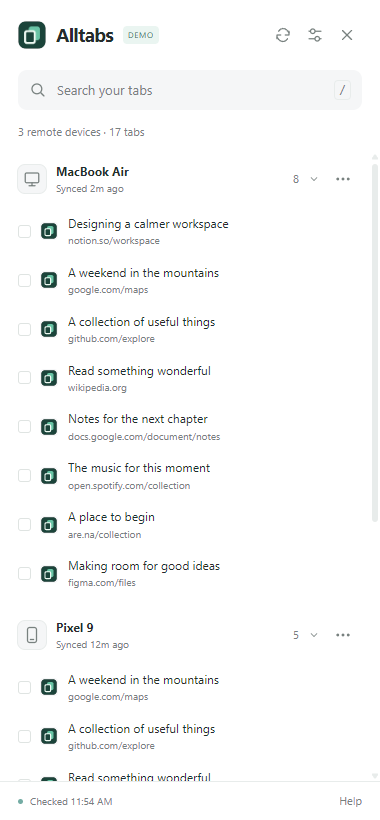
A little less searching. A little more doing.
What you can do with Alltabs
Browse your other devices
Find the tabs you left on your laptop, desktop, or phone, grouped by device in one side panel.
Find a page fast
Search page titles and addresses across visible devices. Jump straight to the tab you have in mind.
Open one tab or a whole batch
Open a single page, select a few, or open all tabs from a device on the computer you’re using now.
Copy the links you need
Select tabs and copy their links, one per line, ready to paste into notes, a message, or a project document.
Choose which devices you see
Hide devices you don’t need and restore them in settings. Keep your panel focused on what matters.
Keep your place as you browse
The side panel stays open as you open tabs, preserving your search and position. Device expansion choices are remembered.
Your tabs stay
your business.
Local processing. No upload to Alltabs.
Alltabs processes tab titles, URLs, searches, and selections locally on your device. It does not upload this data to the developer, the Alltabs website, or any developer-operated server. There is no Alltabs account, analytics, tracking, advertising, or remote code.
Tabs from other devices are supplied by Chrome's own sync service. Alltabs reads the snapshots Chrome makes available; it does not operate a separate sync service. Website icons use Chrome's built-in favicon service, and opening a link connects your browser to that website. These Chrome services and destination websites have their own privacy behavior.
Read the privacy policy →